I cannot find in the stats to add: Fold to C Bet IP and Fold to C bet OOP for SRP. I want to add in popup or direct stats in HUD for flop, turn and river. I can see only C bet IP and C bet OOP, and Call C bet In Position and Call C bet Out of position.
[ img ]

Stats FTR - Fold to Cbet IP & OOP IN SRP
Moderators: WhiteRider, kraada, Flag_Hippo, morny, Moderators
8 posts
• Page 1 of 1
Stats FTR - Fold to Cbet IP & OOP IN SRP
 by fedayn10 » Tue Feb 18, 2025 4:08 am
- fedayn10
- Posts: 16
- Joined: Wed Jan 06, 2021 9:37 am
Re: Stats FTR - Fold to Cbet IP & OOP IN SRP
by Flag_Hippo » Tue Feb 18, 2025 8:15 am
If you add the default 'Fold to F CBet' statistic to your HUD/Popup you can set it for IP/OOP via the 'Item Properties' tab at the top right of the HUD Profile Editor window. Select the stat you want to configure and scroll down to where it says 'Has Position'. There is also a 'Fold To CBet IP & OOP' custom statistic package available in the Download Warehouse. If you want SRP versions that will require custom statistics - you can add this to existing column expressions to create SRP versions:
This guide covers the basics on custom statistics creation and this post demonstrates how to create a new version of a statistic.
- Code: Select all
char_length(cash_hand_summary.str_aggressors_p) = 2
This guide covers the basics on custom statistics creation and this post demonstrates how to create a new version of a statistic.
- Flag_Hippo
- Moderator
- Posts: 17062
- Joined: Tue Jan 31, 2012 7:50 am
Re: Stats FTR - Fold to Cbet IP & OOP IN SRP
by fedayn10 » Wed Feb 19, 2025 3:17 am
If i add 'Fold To CBet IP & OOP' custom statistic package available in the Download Warehouse, the number that will be displayed will be not only for SRP, but for example for 3bet pots, 4bet pots included in one stat?
- fedayn10
- Posts: 16
- Joined: Wed Jan 06, 2021 9:37 am
Re: Stats FTR - Fold to Cbet IP & OOP IN SRP
by Flag_Hippo » Wed Feb 19, 2025 6:13 am
Yes. As per my previous reply if you want that for SRP hands only that will require custom statistics.
- Flag_Hippo
- Moderator
- Posts: 17062
- Joined: Tue Jan 31, 2012 7:50 am
Re: Stats FTR - Fold to Cbet IP & OOP IN SRP
by fedayn10 » Wed Feb 19, 2025 8:27 am
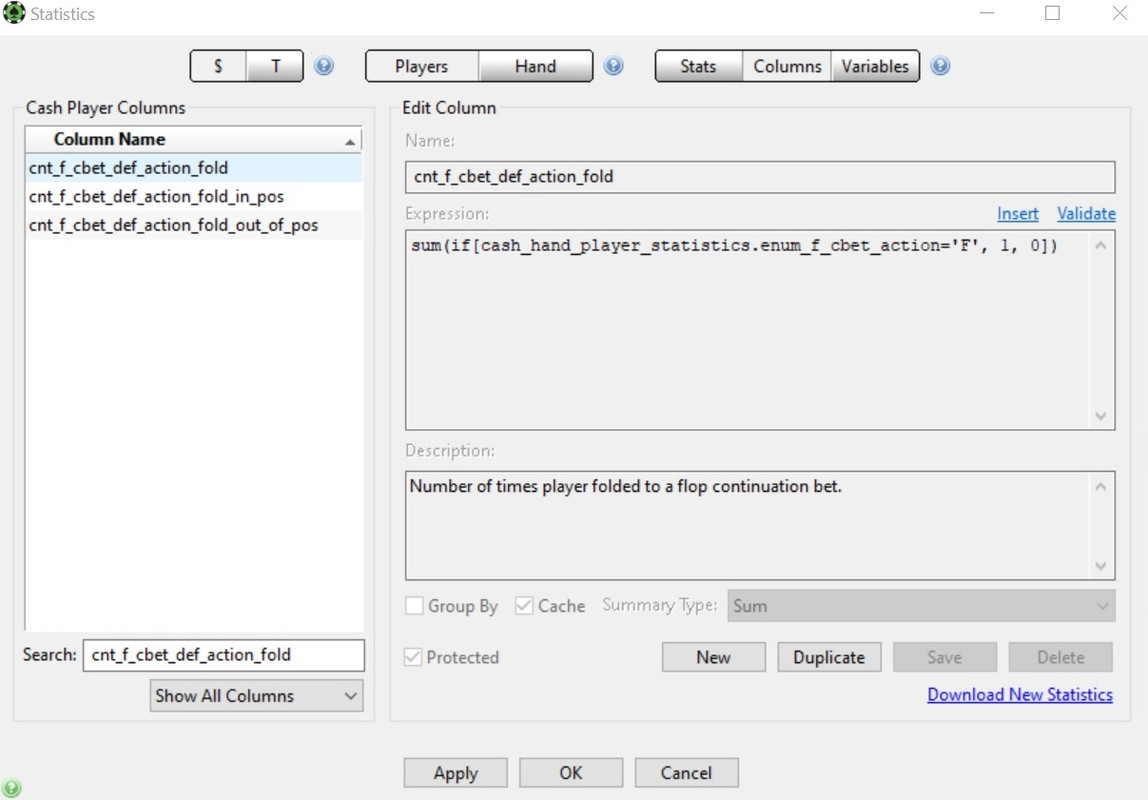
Could you tell me please what are the next steps from here?
https://i.postimg.cc/52Zrfcsh/dd.jpg
https://i.postimg.cc/52Zrfcsh/dd.jpg
- fedayn10
- Posts: 16
- Joined: Wed Jan 06, 2021 9:37 am
Re: Stats FTR - Fold to Cbet IP & OOP IN SRP
by Flag_Hippo » Wed Feb 19, 2025 1:47 pm
The column you have selected in your screenshot (cnt_f_cbet_def_action_fold) is not used in the IP or OOP version of the statistic. In the 'Stats' section you can see the columns used in each statistics 'Value Expression' on the 'Definition' tab.
For example the 'Value Expression' of 'Fold to F CBet In Pos' is this:
Fold to F CBet In Pos
There are 3 columns used here that need to be duplicated and edited to create an SRP version. In the columns section the expression of cnt_f_cbet_def_action_fold_in_pos is this:
cnt_f_cbet_def_action_fold_in_pos
Duplicate the column and rename it with srp at the end and add the code I gave earlier like this:
cnt_f_cbet_def_action_fold_in_pos_srp
Repeat the process for the other two columns (cnt_f_cbet_def_action_call_in_pos & cnt_f_cbet_def_action_raise_in_pos).
After creating the necessary columns go back to the statistics section and create your custom statistic with this value expression:
Fold to F CBet In Pos SRP
For example the 'Value Expression' of 'Fold to F CBet In Pos' is this:
Fold to F CBet In Pos
- Code: Select all
(cnt_f_cbet_def_action_fold_in_pos / (cnt_f_cbet_def_action_fold_in_pos + cnt_f_cbet_def_action_call_in_pos + cnt_f_cbet_def_action_raise_in_pos)) * 100
There are 3 columns used here that need to be duplicated and edited to create an SRP version. In the columns section the expression of cnt_f_cbet_def_action_fold_in_pos is this:
cnt_f_cbet_def_action_fold_in_pos
- Code: Select all
sum(if[not(cash_hand_player_statistics.flg_f_check) AND cash_hand_player_statistics.enum_f_cbet_action='F', 1, 0])
Duplicate the column and rename it with srp at the end and add the code I gave earlier like this:
cnt_f_cbet_def_action_fold_in_pos_srp
- Code: Select all
sum(if[not(cash_hand_player_statistics.flg_f_check) AND cash_hand_player_statistics.enum_f_cbet_action='F' and char_length(cash_hand_summary.str_aggressors_p) = 2, 1, 0])
Repeat the process for the other two columns (cnt_f_cbet_def_action_call_in_pos & cnt_f_cbet_def_action_raise_in_pos).
After creating the necessary columns go back to the statistics section and create your custom statistic with this value expression:
Fold to F CBet In Pos SRP
- Code: Select all
(cnt_f_cbet_def_action_fold_in_pos_srp / (cnt_f_cbet_def_action_fold_in_pos_srp + cnt_f_cbet_def_action_call_in_pos_srp + cnt_f_cbet_def_action_raise_in_pos_srp)) * 100
- Flag_Hippo
- Moderator
- Posts: 17062
- Joined: Tue Jan 31, 2012 7:50 am
Re: Stats FTR - Fold to Cbet IP & OOP IN SRP
by fedayn10 » Thu Feb 20, 2025 10:59 am
Тhanks! I created Fold to Cbet IP and Fold to Cbet OOP for SRP to flop, turn and river. :)
I would like to create also Cbet IP & OOP for flop, turn, river, but i want to be for SRP only. Checked the Download Warehouse and downloaded Cbet IP / OOP by Fox128 Oct. 07, 2011 - but the files are unsuitable for PT4.
I would like to create also Cbet IP & OOP for flop, turn, river, but i want to be for SRP only. Checked the Download Warehouse and downloaded Cbet IP / OOP by Fox128 Oct. 07, 2011 - but the files are unsuitable for PT4.
- fedayn10
- Posts: 16
- Joined: Wed Jan 06, 2021 9:37 am
Re: Stats FTR - Fold to Cbet IP & OOP IN SRP
by Flag_Hippo » Fri Feb 21, 2025 8:09 am
fedayn10 wrote:Checked the Download Warehouse and downloaded Cbet IP / OOP by Fox128 Oct. 07, 2011 - but the files are unsuitable for PT4.
If you are downloading PT3 stats you will need to change the dropdown when importing from .pt4stat to .pt3stat in order to see the files you downloaded in the chooser window.
- Flag_Hippo
- Moderator
- Posts: 17062
- Joined: Tue Jan 31, 2012 7:50 am
8 posts
• Page 1 of 1
Return to Custom Stats, Reports and HUD Profiles
Who is online
Users browsing this forum: No registered users and 5 guests


![[ img ]](https://i.postimg.cc/sGr57g82/ftr.jpg)